
BimmerLink for BMW and MINI
SG Software GmbH & Co. KGAuto & Vehicles
4.2308.00 Reviews
- Version
- 2.37.4-7121
- Installs
- 500.00K
- Age Rating
- Everyone
Screenshots
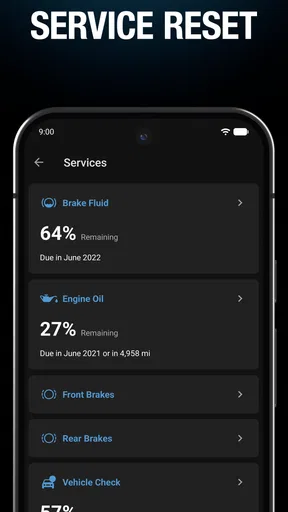
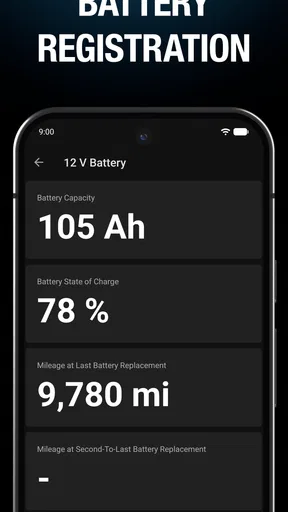
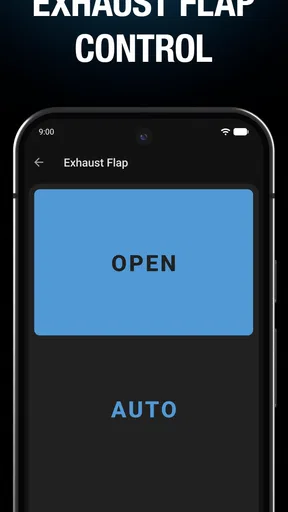
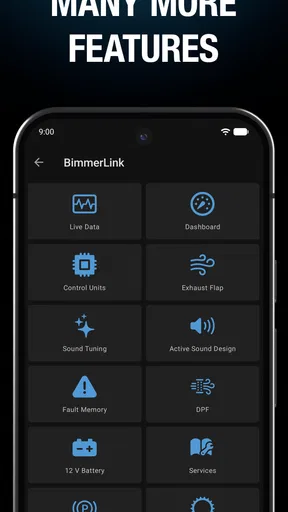
Our Review of BimmerLink for BMW and MINI
 Analysis by Appyee
Before I decide whether an automotive app is worth keeping around, I ask a simple question: does it help me make a better decision about the car, or does it merely give me more numbers to look at? BimmerLink is aimed squarely at BMW and MINI owners who want a closer view of their vehicle’s condition. Its value is not that a phone can replace a mechanic; it is that diagnostic information can make the next step less of a guess.
The app is free to download, with in-app purchases listed from $9.99 to $39.99 per item. I’d treat those as two separate decisions: first, whether the app suits the way you look after your car, and then whether any paid item is worthwhile for your needs. The free price makes it easy to consider, but it does not by itself tell you which functions are included or which purchase you may need, so check the options shown in the app before budgeting around a specific capability.
What you can get from a closer look
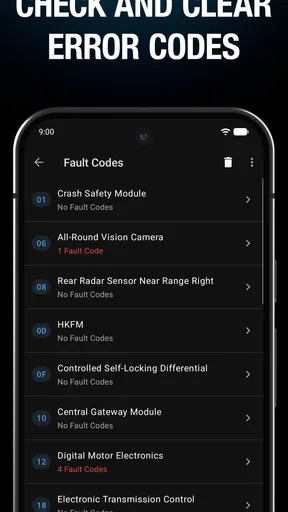
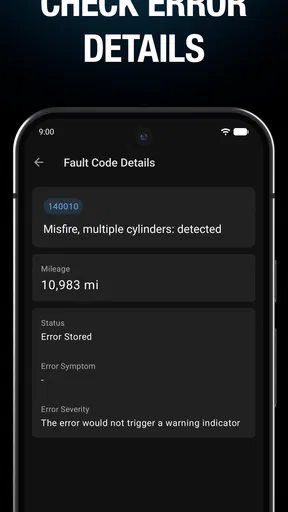
For me, the most practical benefit is context. A warning light can feel urgent, but knowing that the app can read diagnostic trouble codes gives me a way to find out what the car has recorded before deciding what to do. That can help me describe the issue more clearly when I contact a repair shop. It can also help distinguish a situation that needs prompt professional attention from one where I can calmly arrange an inspection. The code is a clue, not a complete diagnosis, and I would not clear a warning simply to make it disappear.
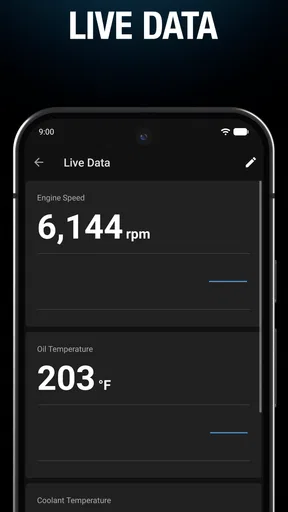
Live sensor readings are another useful part of the appeal. Data such as oil temperature or boost pressure can be interesting to watch, but it is most useful when I have a reason to check it: observing how a car behaves under normal conditions, comparing readings before and after a service, or noticing a pattern that seems unusual. A single figure without context can be misleading, so I would use these readings to ask better questions rather than to declare a component healthy or faulty.
What it costs, and what that means in practice
In the Auto & Vehicles category, BimmerLink is made by SG Software GmbH & Co. KG. It has a 4.3 average from around 4,800 ratings, with more than 100,000 installs, which suggests it has found a substantial audience among owners interested in BMW and MINI diagnostics. It is rated for Everyone, and the current version is 2.36.7-6861. Those details help establish what kind of app this is, but the useful question is still whether its diagnostic focus matches your car-care habits.
The extra spending deserves a little thought. A purchase can make sense if you regularly use the app and know which capability you are paying to access. It is harder to justify if you only want to check one warning once, or if you expect a free download to include every function. I’d look at the in-app purchase descriptions, confirm that the app and the connection equipment suit my vehicle, and only then decide. That small bit of homework is more useful than assuming the highest listed price is automatically necessary.
Trade-offs before you plug in
This is a diagnostic companion, not a substitute for a qualified technician or a repair manual. Reading a code can narrow down what deserves attention, but a code does not always identify the failed part or explain why it occurred. Clearing it without understanding the cause can also hide information that would help with troubleshooting. If a warning is serious, the vehicle is behaving unpredictably, or you are unsure what a result means, I would stop experimenting and get professional advice.
There is also a practical setup step: the app works with a compatible OBD adapter, so the phone alone is not the whole arrangement. The original setup description refers to a Bluetooth connection, but compatibility matters; I would check that a particular adapter works with the app before buying it. If I borrow a car, share one adapter, or switch between vehicles, I would also make a habit of confirming which car is connected before reading or interpreting results.
Compared with a basic code reader, a phone-based tool can be more convenient for reviewing information and keeping it close at hand. Compared with a mechanic’s diagnostic equipment, it is a more limited view and does not provide the same hands-on inspection or repair judgement. That middle position is where I think it makes sense: useful for an owner who wants more insight between service visits, but not the right choice for someone who expects a phone app to certify a car as safe or tell them exactly which repair to make.
When it fits into everyday ownership
Imagine the check engine light comes on while you are preparing for a weekend drive. Rather than guessing from the dashboard symbol, you could connect a compatible adapter, read the stored code, and note what the vehicle has reported. If the result points to something you cannot assess confidently, you can call a repair shop with more specific information. If the car is running roughly or showing a serious warning, the sensible choice is not to continue the trip just because an app has displayed a code; the car’s behaviour and professional advice matter more.
A quieter routine use is checking live readings when you already have a question. For example, after maintenance, you might observe the same kind of data during ordinary driving and make a note of anything that seems inconsistent with the car’s usual behaviour. Avoid trying to interpret every fluctuation as a fault. Conditions change, and trends are more informative than a lone reading. This careful approach makes the app more useful without turning every drive into a hunt for problems.
Who should choose it—and who should pass
I’d recommend considering BimmerLink if you own a BMW or MINI, enjoy understanding what your car is reporting, and are comfortable treating diagnostic information as a starting point. It is especially appealing if you want to prepare for a conversation with a technician, keep an eye on vehicle data, or do basic troubleshooting without pretending that you can diagnose every fault at home. The Android version requires Android 6.0 or later; the app is also available on iOS.
I would skip it if you drive a different make, have no interest in vehicle diagnostics, or want an app that will arrange repairs and explain every warning in plain language. It is also a poor fit if buying and checking a compatible adapter feels like more hassle than the insight is worth. In those cases, a straightforward visit to a repair shop—or a simple reader used with professional guidance—may be the more sensible option.
It has been available since June 7, 2020, and the current version is 2.36.7-6861. I see those as useful reference points when checking whether I have the current release, not as a reason to assume that every adapter or BMW and MINI model will behave identically. Before relying on it, I’d verify the exact phone, vehicle and adapter combination I plan to use, then try it on a familiar, non-urgent task so I know how the connection and readings work.
Getting to Know BimmerLink
The BimmerLink app is like having a mechanic in your pocket. It allows you to monitor and manage your car’s health and performance using your smartphone. Compatible with both iOS and Android, it’s a nifty tool for those who want to keep a close eye on their beloved BMW or MINI.
From reading trouble codes to accessing real-time data, BimmerLink offers a plethora of features that bring the dealership experience to your driveway. But hey, don’t just take my word for it; let’s dive into what this app has to offer.
Unlocking Features and Functions
One of the standout features is the ability to read and clear diagnostic trouble codes. Now, if you’re anything like me, the sight of a check engine light can send your anxiety levels soaring. With BimmerLink, you can quickly identify the issue and decide if it’s something you can fix yourself or if it needs professional attention.
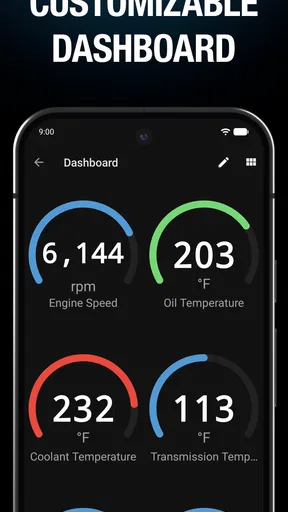
But that’s not all. The app lets you access real-time sensor data. You can monitor everything from oil temperature to boost pressure, giving you an in-depth look at how your vehicle is performing right now. It’s like having a live stream of your car’s vital signs, and for those of us who love to tinker, this is a dream come true.
"BimmerLink lets you play detective, uncovering the mysteries under the hood."
Ease of Use and Interface
Now, let’s talk about the user experience. The interface is sleek and intuitive, making it easy for anyone to navigate. Whether you’re a tech wizard or someone who struggles with basic smartphone functions, you’ll find BimmerLink straightforward and user-friendly.
The app connects seamlessly via Bluetooth, and the setup process is a breeze. Just plug in a compatible OBD adapter, and you’re good to go. No complex configurations, just a few taps and you’re in the driver’s seat of your car’s digital dashboard.
Who Will Benefit the Most?
So, who’s this app really for? I’d say it’s perfect for BMW and MINI owners who like being proactive about their vehicle’s maintenance. If you’re someone who loves being hands-on and wants to avoid unnecessary trips to the mechanic, BimmerLink is a fantastic investment.
Moreover, for those into performance tuning, the app provides valuable insights that can help optimize your car’s performance. Think of it as your personal assistant, providing you with the data you need to make informed decisions about your vehicle.
The Bottom Line
In conclusion, BimmerLink is not just an app; it’s a game-changer for BMW and MINI enthusiasts. It offers a unique blend of convenience and insight, empowering users to take control of their vehicle’s health like never before.
If you’re ready to dive deeper into the workings of your car and want to enhance your driving experience, then BimmerLink is definitely worth checking out. It’s like having a peek behind the curtain of your car’s performance, and trust me, once you start using it, you’ll wonder how you ever lived without it.
Ready to give it a whirl? You can download BimmerLink on both Android and iOS. Go ahead, unleash the full potential of your BMW or MINI, and enjoy the ride!
Verdict
Strengths of BimmerLink for BMW and MINI
- Easy-to-use interface for beginners.
- Real-time data monitoring feature.
- Comprehensive diagnostic capabilities.
- Supports multiple BMW and MINI models.
- Regular updates with new features.
Limitations of BimmerLink for BMW and MINI
- Requires a compatible OBD adapter.
- Limited functionality without premium.
- May drain battery quickly if left open.
- Some features require in-app purchases.
- Interface may be complex for casual users.
Other Releases by SG Software GmbH & Co. KG
View All
BimmerCode for BMW and MINI
Auto & Vehicles4.2
Similar Picks in This Category
View All
Android Auto
Google LLC4.1

maxim — order a taxi & food
PT. SITO4.7

Штрафы ГИБДД: проверка с фото
Pays LLC – Штрафы ГИБДД4.7

Номерограм – проверка авто
Авто Ассист4.8

Дром Авто
Дром4.9

Frequently Asked Questions
What is BimmerLink and what does it do?
BimmerLink is a diagnostic app specifically designed for BMW and MINI vehicles. It allows users to monitor real-time data, read and clear error codes, and access the electronic control units of their cars. This app is an essential tool for enthusiasts who want to keep track of their vehicle's performance and health.
Is BimmerLink compatible with all BMW and MINI models?
BimmerLink is compatible with most BMW and MINI models. However, compatibility may vary depending on the vehicle's production year and specific features. It is recommended to check the app's official website or contact support to confirm compatibility with your particular model before purchasing.
Does BimmerLink require any additional hardware to function?
Yes, BimmerLink requires an OBD-II adapter to connect your smartphone to the car. The app recommends using specific adapters like the OBDLink CX or the Veepeak BLE+ for optimal performance. These adapters are essential for ensuring a stable and secure connection between your device and the vehicle's onboard system.
Can BimmerLink clear error codes and perform resets?
BimmerLink allows users to read and clear error codes from the vehicle's electronic control units. Additionally, it can reset various adaptations such as the automatic transmission, steering angle sensor, and more. This functionality helps users maintain their vehicle's performance and resolve minor issues without visiting a mechanic.
Is BimmerLink user-friendly for those without technical expertise?
BimmerLink is designed with a user-friendly interface, making it accessible even for users without extensive technical knowledge. The app provides clear instructions and intuitive navigation, allowing users to easily monitor their vehicle's data and perform necessary actions. However, some familiarity with automotive terminology may enhance the user experience.
